样式方案:在 Vite 中接入现代化的 CSS 工程化方案
刀刀
0字
0分钟
2026/8/17
核心主旨
样式工程化是现代前端项目不可或缺的一环。原生 CSS 存在开发体验欠佳、样式污染、浏览器兼容性差、产物体积过大等四大痛点。本文系统梳理了社区主流的 5 类 CSS 工程化方案(CSS 预处理器、CSS Modules、PostCSS、CSS in JS、CSS 原子化框架),并通过实战演示如何在 Vite 中零配置或自定义接入这些方案,帮助你根据项目痛点选择合适的样式策略。
原生 CSS 的四大痛点与解决方案矩阵
原生 CSS 的核心问题
css
/* 问题1:开发体验欠佳 - 选择器无法嵌套,代码冗余 */
.container .header .nav .title .text {
  color: blue;
}
.container .header .nav .box {
  color: blue;
  border: 1px solid grey;
}
/* 问题2:样式污染 - 全局类名冲突 */
/* a.css */
.container {
  color: red;
}
/* b.css */
.container {
  color: blue;
} /* 可能覆盖 a.css!*/
/* 问题3:浏览器兼容 - 需手动添加前缀 */
.element {
  -webkit-transition: all 0.3s;
  -moz-transition: all 0.3s;
  -o-transition: all 0.3s;
  transition: all 0.3s;
}
/* 问题4:产物体积 - 未使用的样式也被打包 */五大解决方案对比矩阵
| 方案类型 | 代表工具 | 核心优势 | 解决的问题 | 适用场景 |
|---|---|---|---|---|
| CSS 预处理器 | Sass/Less/Stylus | 变量、嵌套、逻辑控制 | 开发体验、代码复用 | 传统项目、需要样式复用 |
| CSS Modules | 内置支持 | 类名哈希化 | 样式污染、命名冲突 | 组件化开发、隔离样式 |
| PostCSS | autoprefixer/pxtorem | AST 解析与转换 | 浏览器兼容、单位转换 | 跨浏览器适配、移动端 |
| CSS in JS | styled-components/emotion | JavaScript 中写样式、动态样式 | 开发体验、样式隔离、DCE | React 项目、动态主题 |
| CSS 原子化 | Tailwind CSS/Windi CSS | 原子类名、按需生成 | 开发效率、产物体积 | 快速原型、设计系统 |
CSS 预处理器实战:Sass/Less/Stylus
Vite 的零配置支持
Vite 内置对 CSS 预处理器的支持,只需安装对应库即可使用:bash
# 安装 Sass(以 Sass 为例)
pnpm i sass -D基础使用示例
tsx
// src/components/Header/index.tsx
import './index.scss';

export function Header() {
  return <p className="header">This is Header</p>
}

// src/components/Header/index.scss
.header {
  color: red; // 支持嵌套语法
  &:hover {
    color: blue;
  }
}全局变量注入配置
痛点:每次使用全局变量都需手动 @import,代码冗余。
解决方案:通过 vite.config.ts 的 css.preprocessorOptions 自动注入。
typescript
// vite.config.ts
import { defineConfig, normalizePath } from 'vite'
import path from 'path'
import react from '@vitejs/plugin-react'

// 全局 scss 文件路径(使用 normalizePath 解决 Windows 路径问题)
const variablePath = normalizePath(path.resolve('./src/variable.scss'))

export default defineConfig({
  plugins: [react()],
  css: {
    preprocessorOptions: {
      scss: {
        // additionalData 的内容会在每个 scss 文件开头自动注入
        additionalData: `@import "${variablePath}";`,
      },
    },
  },
})scss
// src/variable.scss
$theme-color: red;
$font-size-base: 16px;

// 任意 .scss 文件中可直接使用,无需手动 import
.header {
  color: $theme-color;
  font-size: $font-size-base;
}预处理器配置项参考
| 预处理器 | 配置文档 | 常用配置项 |
|---|---|---|
| Sass | 官方文档 | additionalData, implementation |
| Less | 官方文档 | additionalData, javascriptEnabled |
| Stylus | 官方文档 | additionalData, define |
CSS Modules:样式隔离的利器
开箱即用的使用方式
Vite 对后缀带有 .module 的样式文件自动应用 CSS Modules:
tsx
// src/components/Header/index.tsx
import styles from './index.module.scss'; // 注意:文件名包含 .module

export function Header() {
  return <p className={styles.header}>This is Header</p>
}

// src/components/Header/index.module.scss
.header {
  color: red;
}浏览器渲染结果:
html
<!-- 类名被处理成哈希值,避免全局冲突 -->
<p class="_header_kcvt0_1">This is Header</p>自定义类名生成策略
通过 css.modules.generateScopedName 配置开发时的类名格式,提升调试体验:
typescript
// vite.config.ts
export default defineConfig({
  css: {
    modules: {
      // 自定义类名生成规则
      // [name] - 文件名, [local] - 原始类名, [hash:base64:5] - 5位哈希
      generateScopedName: '[name]__[local]___[hash:base64:5]',
    },
  },
})效果对比:
| 配置 | 生成类名示例 | 适用场景 |
|---|---|---|
| 默认 | _header_kcvt0_1 | 生产环境 |
| 自定义 | index__header__kcvt0 | 开发调试(可读性更强) |
CSS Modules 配置项参考
完整配置项可查阅 postcss-modules 文档: generateScopedName: 类名生成规则 hashPrefix: 哈希前缀 localsConvention: 类名转换规则(camelCase 等)
PostCSS:CSS 的后处理器引擎
核心能力与插件生态
PostCSS 通过 AST(抽象语法树)解析 CSS,可实现:- 自动添加浏览器前缀(autoprefixer)
- px 转 rem(postcss-pxtorem)
- 支持最新 CSS 语法(postcss-preset-env)
- 代码压缩优化(cssnano)
Autoprefixer 实战配置
bash
pnpm i autoprefixer -Dtypescript
// vite.config.ts
import autoprefixer from 'autoprefixer'

export default defineConfig({
  css: {
    postcss: {
      plugins: [
        autoprefixer({
          // 指定目标浏览器范围
          overrideBrowserslist: ['Chrome > 40', 'ff > 31', 'ie 11'],
        }),
      ],
    },
  },
})编译效果:
css
/* 源码 */
.header {
  text-decoration: dashed;
}

/* 打包产物(自动添加前缀)*/
._header_kcvt0_1 {
  -webkit-text-decoration: dashed;
  -moz-text-decoration: dashed;
  text-decoration: dashed;
}主流 PostCSS 插件矩阵
| 插件名称 | 功能 | 适用场景 | 配置示例 |
|---|---|---|---|
| autoprefixer | 自动添加浏览器前缀 | 跨浏览器兼容 | overrideBrowserslist |
| postcss-pxtorem | px 转 rem | 移动端适配 | rootValue: 16 |
| postcss-preset-env | 支持最新 CSS 语法 | 未来语法兼容 | stage: 3 |
| cssnano | 智能压缩 CSS | 生产环境优化 | preset: 'default' |
插件资源:探索更多插件请访问 链接
CSS in JS:在 JavaScript 中写样式
主流方案对比
| 方案 | Babel 插件 | 特点 | 适用框架 |
|---|---|---|---|
| styled-components | babel-plugin-styled-components | 标签模板语法 | React |
| emotion | @emotion/babel-plugin | 更轻量、性能优 | React/Vue |
Vite 集成配置
typescript
// vite.config.ts
import { defineConfig } from 'vite'
import react from '@vitejs/plugin-react'

export default defineConfig({
  plugins: [
    react({
      babel: {
        plugins: [
          // 适配 styled-components
          'babel-plugin-styled-components',
          // 适配 emotion
          '@emotion/babel-plugin',
        ],
      },
      // emotion 专属配置:支持特殊 jsx 语法
      jsxImportSource: '@emotion/react',
    }),
  ],
})使用示例
tsx
// styled-components 示例
import styled from 'styled-components'

const Button = styled.button`
  background: blue;
  color: white;
  padding: 10px 20px;

  &:hover {
    background: darkblue;
  }
`

// emotion 示例
/** @jsxImportSource @emotion/react */
import { css } from '@emotion/react'

const buttonStyle = css`
  background: blue;
  color: white;
  padding: 10px 20px;
`

function App() {
  return <button css={buttonStyle}>Click me</button>
}CSS in JS 构建侧考量
| 考量维度 | 解决方案 |
|---|---|
| 选择器命名 | Babel 插件自动生成哈希类名 |
| DCE(死代码消除) | Babel 插件标记未使用样式 |
| 代码压缩 | 生产环境通过 Babel 插件优化 |
| SourceMap | 插件支持生成源码映射 |
| SSR 支持 | 框架提供服务端渲染 API |
CSS 原子化框架:Tailwind CSS vs Windi CSS
方案对比
| 特性 | Tailwind CSS v2 | Windi CSS | Tailwind CSS v3 |
|---|---|---|---|
| 编译速度 | 慢 | 快 20-100 倍 | 快(引入 JIT) |
| 按需生成 | 全量打包 | 按需编译 | JIT 模式 |
| 高级功能 | 基础原子类 | Attributify/Shortcuts | 基础原子类 |
| 配置方式 | tailwind.config.js | windi.config.ts | tailwind.config.js |
Windi CSS 接入实战
bash
pnpm i windicss vite-plugin-windicss -Dtypescript
// vite.config.ts
import windi from 'vite-plugin-windicss'

export default defineConfig({
  plugins: [
    windi(), // 启用 Windi CSS 插件
  ],
})tsx
// src/main.tsx - 必须引入虚拟 CSS 文件
import 'virtual:windi.css'使用示例:
tsx
// src/components/Header/index.tsx
export function Header() {
  return (
    <div className="p-20px text-center">
      <h1 className="font-bold text-2xl mb-2">Vite + Windi CSS</h1>
    </div>
  )
}Windi CSS 高级功能
Attributify(属性化模式)
typescript
// windi.config.ts
import { defineConfig } from 'vite-plugin-windicss'

export default defineConfig({
  attributify: true, // 开启属性化模式
})使用效果:
tsx
<!-- 传统写法 -->
<button className="bg-blue-400 hover:bg-blue-500 text-sm text-white font-mono p-y-2 p-x-4">
  Button
</button>

<!-- Attributify 写法(更语义化)-->
<button
  bg="blue-400 hover:blue-500"
  text="sm white"
  font="mono light"
  p="y-2 x-4"
  border="2 rounded blue-200"
>
  Button
</button>类型声明(避免 TS 报错):
typescript
// types/shim.d.ts
import { AttributifyAttributes } from 'windicss/types/jsx'

declare module 'react' {
  type HTMLAttributes<T> = AttributifyAttributes
}Shortcuts(快捷方式)
typescript
// windi.config.ts
export default defineConfig({
  shortcuts: {
    // 封装常用类名组合
    'flex-c': 'flex justify-center items-center',
    'btn-primary': 'bg-blue-500 text-white px-4 py-2 rounded',
  },
})tsx
// 使用 shortcuts
<div className="flex-c">Centered content</div>
<button className="btn-primary">Primary Button</button>Tailwind CSS 接入流程
bash
pnpm install -D tailwindcss postcss autoprefixerjavascript
// tailwind.config.js
module.exports = {
  content: [
    './index.html',
    './src/**/*.{vue,js,ts,jsx,tsx}', // 扫描这些文件中的类名
  ],
  theme: {
    extend: {},
  },
  plugins: [],
}

// postcss.config.js
module.exports = {
  plugins: {
    tailwindcss: {},
    autoprefixer: {},
  },
}入口文件引入:
css
/* src/index.css */
@tailwind base;
@tailwind components;
@tailwind utilities;使用示例:
tsx
function App() {
  return (
    <div>
      <img src={logo} className="w-20" alt="logo" />
      <p className="bg-red-400">Hello Vite + Tailwind!</p>
    </div>
  )
}原子化框架选型建议
| 项目特征 | 推荐方案 | 理由 |
|---|---|---|
| 追求极致开发速度 | Windi CSS | 编译快、Attributify 提升效率 |
| 需要稳定生态 | Tailwind CSS v3 | 社区庞大、文档完善 |
| 已有 Tailwind CSS v2 项目 | 升级到 v3 | 引入 JIT 解决性能问题 |
| 需要高级定制 | Windi CSS | Shortcuts/Attributify 更灵活 |
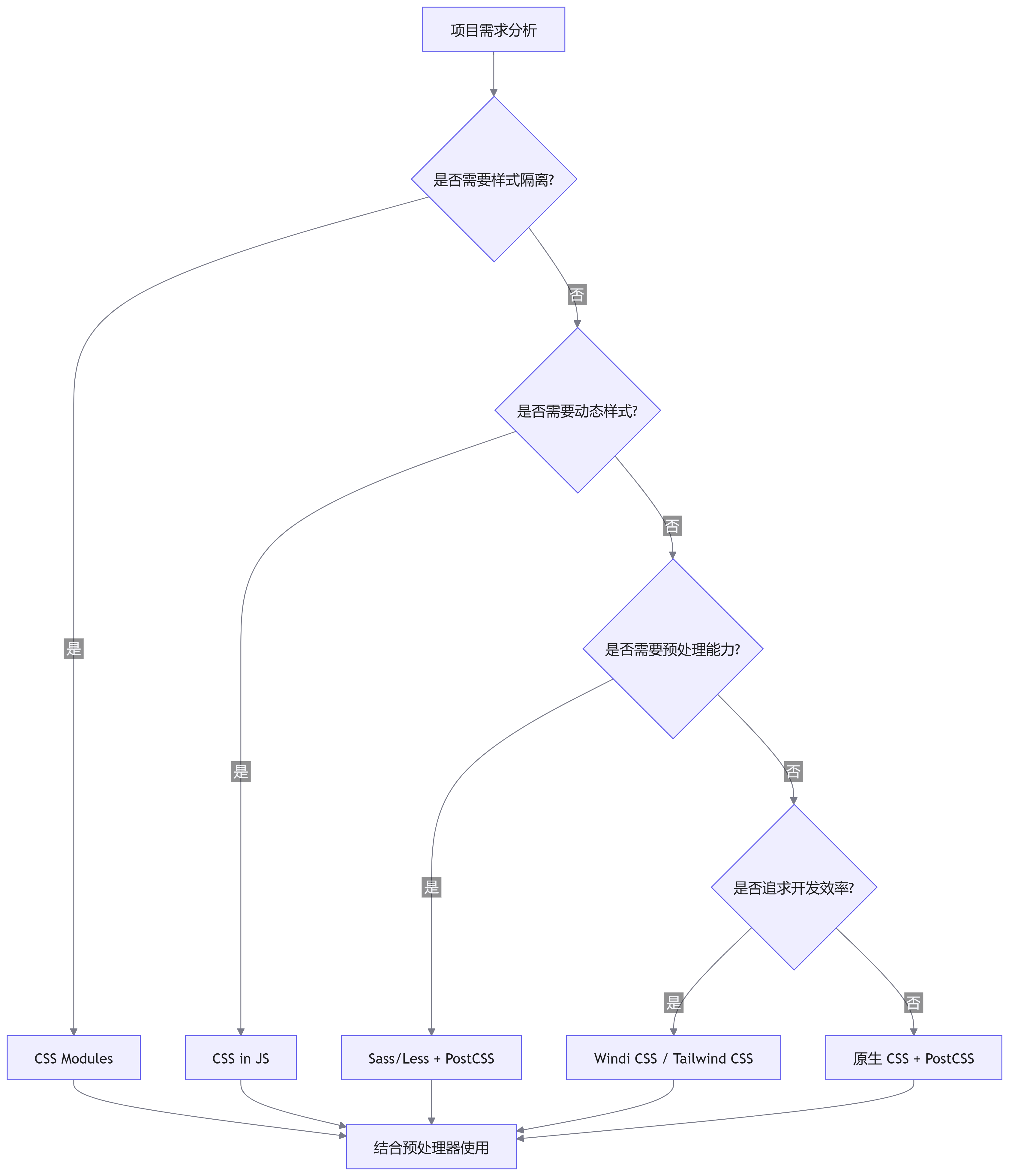
样式方案选型决策树
贡献者
 duyidao 刀刀