Function Tool
刀刀
0字
0分钟
2026/8/18
机制概述
大模型操作局限
LLM 可以回答问题,但无法直接执行具体操作(如订票)。大模型只会回复订票方法说明,不会真正调用订票接口。上下文方案
上下文方案实现
通过上下文方案解决:在提示词中约定,若用户要求订票,则返回 JSON 数据。代码层检测到该数据后,调用预先编写的订票方法。
md
# 角色

你是一个个人助手

# 逻辑

1. 用户如果要订票,则返回如下json,json中的target属性,就是用户本次订票的目的地。当你返回json数据时,不要代码md格式,直接返回json数据。

```json
{
  "type": "ticket",
  "arguments": {
    "target": "目的地"
  }
}
```js
app.get('/simple', async (req, res) => {
  const { keyword } = req.query
  const system = fs.readFileSync('./context2.md')
  const systemString = systemString.toString()
  const llmres = await openai.chat.completions.create({
    model: 'qwen-plus',
    messages: [
      {
        role: 'system',
        content: systemString,
      },
      {
        role: 'user',
        content: keyword,
      },
    ],
  })
  const message = llmres.choices[0].message
  const content = JSON.parse(message.content)
  if (content.type === 'ticket') {
    // 调用订票方法。真正做订票这个事情,是通过提前写好的代码来实现的。
    const ticket = await ticket(content.arguments.target)
    res.json(ticket)
  }
  res.json(message)
})上下文方案缺陷
此方案存在以下问题:
- 当用户只需普通聊天时,
content返回的是普通文本而非 JSON 字符串,JSON.parse会报错。核心矛盾:无法区分content究竟是要调用内置方法的 JSON,还是纯文本回复。 - 并非所有大模型都能稳定理解上下文并返回标准 JSON。部分模型可能在 JSON 前后附加额外文字,或包裹 Markdown 代码块语法。
需要一种机制,将"大模型调用方法"与"纯文本回答"明确区分,且所有模型统一遵循。
Function Tool 机制
意义:LLM 只能做语言回答与逻辑推理,无法执行具体操作。通过 Function Tool 机制,提前声明可用工具,大模型在需要时返回工具调用指令,由代码层执行。
规范:所有大模型接口遵循统一的 Function Tool 定义与输出规范。告知大模型可用工具时使用同一种格式输入,大模型声明调用哪个工具也使用同一种格式输出。
区分:大模型调用 Function Tool 时使用独立字段,不与 content 混合;将执行结果反馈给大模型时,使用专门的 role: tool。
定义 Function Tool
js
const response = await openai.chat.completions.create({
  ...message, // model 等属性
  tools: [
    {
      type: 'function', // 固定值
      function: {
        name: 'ticket', // 工具名称
        description: '订票工具', // 工具描述
        // 工具参数,用 JSON Schema 定义
        parameters: {
          type: 'object', // 参数类型
          properties: {
            city: {
              type: 'string', // 参数类型
              description: '出发城市', // 参数描述
            },
          },
          required: ['city'], // 必填参数
        },
      },
    },
  ],
})Function Tool 实现
js
const tools = [
  {
    type: 'function',
    function: {
      name: 'ticket',
      description: '当用户需要订票的时候调用此订票工具',
      parameters: {
        type: 'object',
        properties: {
          target: {
            type: 'string',
            description: '用户要去的城市目的地',
          },
        },
        required: ['target'],
      },
    },
  },
]

const toolMap = {
  ticket() {},
}

module.exports = {
  tools,
  toolMap,
}js
const { tools, toolMap } = require('./tools.js')

app.get('/simple', async (req, res) => {
  const { keyword } = req.query
  const system = fs.readFileSync('./context2.md')
  const systemString = systemString.toString()
  const llmres = await openai.chat.completions.create({
    model: 'qwen-plus',
    messages: [
      {
        role: 'system',
        content: systemString,
      },
      {
        role: 'user',
        content: keyword,
      },
    ],
    tools: tools,
  })
  const message = llmres.choices[0].message
  res.json(message)
})流式传输
生产环境的接口通常使用 SSE 流式传输。大模型调用 Function Tool 时也会分片段返回,但必须等全部返回后再处理,不可像文本那样边返回边处理。
js
const { tools, toolMap } = require('./tools.js')

app.get('/simple', async (req, res) => {
  const { keyword } = req.query
  const system = fs.readFileSync('./context2.md')
  const systemString = systemString.toString()
  const llmres = await openai.chat.completions.create({
    model: 'qwen-plus',
    messages: [
      {
        role: 'system',
        content: systemString,
      },
      {
        role: 'user',
        content: keyword,
      },
    ],
    tools: tools,
    stream: true,
  })
  const chunkList = [] // 单纯用来查看数据用,无实际用处
  for await (const chunk of llmres) {
    chunkList.push(chunk)
  }
  fs.writeFileSync('./chunk.json', JSON.stringify(chunkList, null, 2)) // 单纯用来查看数据用,无实际用处
  const message = llmres.choices[0].message
  res.json(message)
})查看数据格式,choices 中 delta 多了 tool_calls 字段,即 Function Tool 的返回结果。返回逻辑如下:
- 首次返回完整数据对象,包含
id、index、type、function对象,function对象包含name和arguments两个属性,name是函数名,arguments是函数参数。 - 后续
arguments拆成片段逐次返回。属性可能缺失,如name和id。
json
[
  {
    // ...
    "choices": [
      {
        // ...
        "delta": {
          "content": "",
          "role": "assistant",
          "tool_calls": [
            {
              "index": 0,
              "id": "tool_0",
              "type": "function",
              "function": {
                "name": "ticket",
                "arguments": ""
              }
            }
          ]
        }
      }
    ]
  },
  {
    // ...
    "choices": [
      {
        "delta": {
          "tool_calls": [
            {
              "function": {
                "arguments": "beijing"
              },
              "index": 0,
              "id": "",
              "type": "function"
            }
          ]
        }
      }
    ]
  }
]掌握数据格式后,实现 tool_calls 的处理逻辑。
js
const { tools, toolMap } = require('./tools.js')

app.get('/simple', async (req, res) => {
  const { keyword } = req.query
  const system = fs.readFileSync('./context2.md')
  const systemString = systemString.toString()
  const llmres = await openai.chat.completions.create({
    model: 'qwen-plus',
    messages: [
      {
        role: 'system',
        content: systemString,
      },
      {
        role: 'user',
        content: keyword,
      },
    ],
    tools: tools,
    stream: true,
  })
  let resObj = {
    role: 'assistant',
    id: '',
    content: '',
  }
  for await (const chunk of llmres) {
    const delta = chunk.choices[0].delta
    resObj.id = chunk.id
    resObj.content += delta.content
    // 判断是否有方法调用
    if (delta.tool_calls && delta.tool_calls.length > 0) {
      // 拼接 tool_calls 部分
      if (resObj.tool_calls) {
        // 已经是第一个以后的 chunk,直接走拼接
        delta.tool_calls.forEach((toolCall) => {
          const toolIndex = toolCall.index
          // 根据index找到resObj,要拼接的对象
          const targetTool = resObj.tool_calls[toolIndex]
          if (chunkTool.function?.name) {
            targetTool.function.name += chunkTool.function.name
          }
          if (chunkTool.function?.arguments) {
            targetTool.function.arguments += chunkTool.function.arguments
          }
        })
      }
      else {
        // 是第一个 chunk,走赋值
        resObj.tool_calls = delta.tool_calls
      }
    }
  }
  res.end()
})执行 Function Tool
执行流程
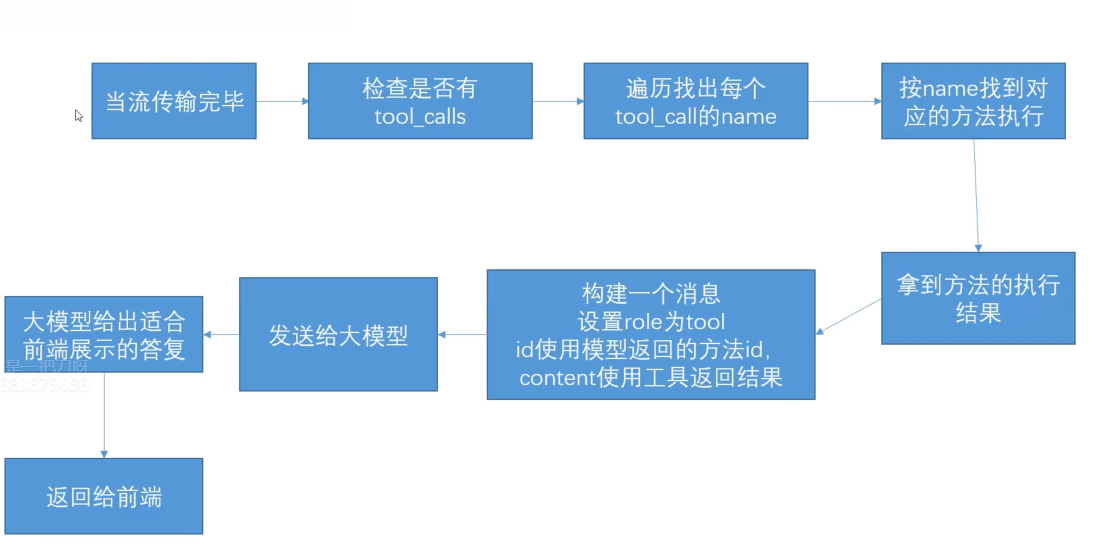
执行代码实现
js
const { tools, toolMap } = require('./tools.js')

app.get('/simple', async (req, res) => {
  const { keyword } = req.query
  const system = fs.readFileSync('./context2.md')
  const systemString = systemString.toString()
  const llmres = await openai.chat.completions.create({
    model: 'qwen-plus',
    messages: [
      {
        role: 'system',
        content: systemString,
      },
      {
        role: 'user',
        content: keyword,
      },
    ],
    tools: tools,
    stream: true,
  })

  let resObj = {
    role: 'assistant',
    id: '',
    content: '',
  }

  for await (const chunk of llmres) {
    const delta = chunk.choices[0].delta
    resObj.id = chunk.id
    resObj.content += delta.content
    // 判断是否有方法调用

    if (delta.tool_calls && delta.tool_calls.length > 0) {
      // 拼接 tool_calls 部分

      if (resObj.tool_calls) {
        // 已经是第一个以后的 chunk,直接走拼接

        delta.tool_calls.forEach((toolCall) => {
          const toolIndex = toolCall.index
          // 根据index找到resObj,要拼接的对象
          const targetTool = resObj.tool_calls[toolIndex]

          if (chunkTool.function?.name) {
            targetTool.function.name += chunkTool.function.name
          }

          if (chunkTool.function?.arguments) {
            targetTool.function.arguments += chunkTool.function.arguments
          }
        })
      } else {
        // 是第一个 chunk,走赋值
        resObj.tool_calls = delta.tool_calls
      }
    }
  }
  if (resObj.tool_calls && resObj.tool_calls.length > 0) {
    const toolCalls = resObj.tool_calls
    for (let toolIndex = 0; toolIndex < toolCalls.length; toolIndex++) {
      const singleToolCall = toolCalls[toolIndex]
      const toolName = singleToolCall.function.name // 工具名称
      const toolArguments = JSON.parse(singleToolCall.function.arguments) // 工具参数
      const result = await toolMap[name](arguments) // 方法执行可能是异步的
      const toolQueryObj = {
        role: 'tool',
        content: result,
        id: singleToolCall.id,
      }
      const llmres = await openai.chat.completions.create({
        model: 'qwen-plus',
        messages: [
          {
            role: 'system',
            content: systemString,
          },
          ...singleConvertList,
          toolQueryObj,
        ],
        tools: toolList,
        stream: true,
      })
    }
  }
  res.end()
})前端消息过滤
调用 Function Tool 时前端不应展示中间过程。以订票为例,用户发出订票指令后,应直接收到"订票成功"的答复,工具调用与执行结果均不展示。
- 前端判断
content为空字符串时不展示 role为tool的消息也不展示
贡献者
 刀刀
刀刀