流式传输
刀刀
0字
0分钟
2026/8/17
怎么做
后端
llm改为stream流式传输- AI 接口修改为
stream返回
前端
用SSE方案接收后端数据
SSE 技术
SSE 是一种基于 HTTP 的传输技术,允许接口持续向前端发送消息,而非传统 HTTP 的一次性返回后即断开。在 SSE 方案下,接口仍为 HTTP 接口,但可将返回内容拆分,逐部分下发。定义 SSE 接口
- 正常定义一个接口
- 修改响应头
- 通过
res.write方法按固定格式一次次的写入响应,而不是一次性给入
js
app.get("/sse", async (req, res) => {
  res.writeHead(200, {
    "Content-Type": "text/event-stream; charset=utf-8", // stream 流式传输;防止中文乱码
    "Cache-Control": "no-cache", // 防止缓存
    "Connection": "keep-alive", // 保持长连接
    "Access-Control-Allow-Origin": "*",
  });
  const arr = ['你好', 'AI', '你', '能', '做什么']
  let i = 0
  const timer = setInterval(() => {
    if (i < arr.length) {
      res.write(`data: ${JSON.stringify(arr[i])}\n\n`) // 两个 /n 表示换行
      i++
    }
    else {
      clearInterval(timer)
      res.write(`data: ${JSON.stringify({ done: true })\n\n}`)
      res.end()
    }
  }, 1000)
})js
const test = ref('')
onMounted(() => {
  const eventSource = new EventSource('http://localhost:3000/sse')
  eventSource.onmessage = (event) => {
    console.log(JSON.parse(event.data))
    const _data = JSON.parse(event.data)
    // 结束了,关闭连接
    if (_data.done) {
      eventSource.close()
    }
    // 更新数据
    else {
      test.value += _data
    }
  }
})但此方式存在明显缺陷:
- 只能是
GET请求 - Token 必须携带在请求头上,不安全
- 前端处理较繁琐
成熟方案
- 接口侧将调用大模型处添加
stream: true,按读取流的方式读取内容 - 前端使用
@microsoft/fetch-event-source库
此库可解决上述问题,使用简便。
接口处理逻辑
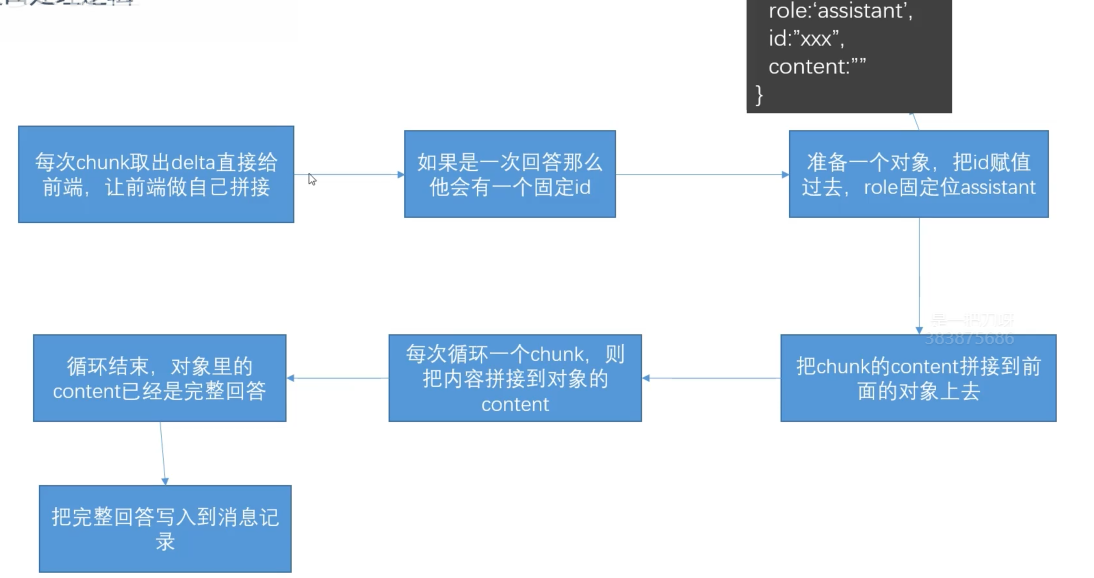
参数格式
在之前的代码中,消息都是通过 messages 参数获取的;修改为流式后,接口字段修改为通过 delta 获取。
js
;[
  {
    model: 'qwen-plus',
    id: 'xxx',
    created: 1688426147,
    object: 'chat.completion.chunk',
    usage: null,
    choices: [
      {
        index: 0,
        delta: {
          role: 'assistant',
          content: '你好,我是小Q,有什么可以帮助你的吗?',
        },
      },
    ],
  },
]代码修改
js
app.use(express.json()) // 设置解析请求体,这样才能拿到 req.body
// 请求不再是get请求
app.post('/llm', async (req, res) => {
  // 设置请求头
  res.writeHead(200, {
    'Content-Type': 'text/event-stream',
    'Cache-Control': 'no-cache',
    Connection: 'keep-alive',
  })
  const { keyword, userId, convertId } = req.query
  const { keyword, userId, convertId } = req.body
  const conversationObj = readConversation()
  const singleConvertList = conversationObj[userId][convertId].list // 用户对话列表
  const queryObj = {
    role: 'user',
    content: keyword,
  }
  if (singleConvertList.length > 10) {
    //算出来要截取多少条
    //多截取一些,方便ai接口多给我们总结一下,所以设为6,每次大于10只保留6条。
    const removeNum = singleConvertList.length - 6
    const removeList = singleConvertList.splice(1, removeNum)
    const summaryRes = await summaryMessage(openai, removeList)
    singleConvertList.splice(1, 0, summaryRes)
  }
  //每次提问,存到singleConvertList,保存上下文
  singleConvertList.push(queryObj)
  console.log(singleConvertList)
  const llmres = await openai.chat.completions.create({
    model: 'qwen-plus',
    // system手动添加上去,避免丢失
    messages: [
      {
        role: 'system',
        content: systemString,
      },
      ...singleConvertList,
    ],
    stream: true, // 开启流式返回
  })
  let chunkList = [] // 无实际作用,单纯用于打印查看数据格式
  let resObj = {
    role: 'assistant',
    id: '',
    content: '',
  } // 后端传给前端的数组对象每一项对象
  // for of 循环,依次流式保存
  for await (let chunk of llmres) {
    chunkList.push(chunk)
    const delta = chunk.choices[0].delta
    resObj.id = chunk.id
    resObj.content += delta.content
    res.write(`data: ${JSON.stringify(delta)} \n\n`)
  }
  // for of 循环结束,才会执行下一行
  fs.writeFileSync('./chunkList.json', JSON.stringify(chunkList)) // 保存到文件内,查看数据格式,无实际用处
  //每次回答,存到singleConvertList,保存上下文
  singleConvertList.push(llmres.choices[0].message)
  singleConvertList.push(resObj)
  res.write(`data: ${JSON.stringify({ done: true })} \n\n`)
  res.end()
})js
import { fetchEventSource } from '@microsoft/fetch-event-source'
export function requestLLM(keyword, userId, convertId, callback) {
  fetchEventSource('http://localhost:3000/api/llm', {
    method: 'POST',
    headers: {
      'Content-Type': 'application/json', // 请求是json,后端才能解析body
      auth: 'xxxxx',
    },
    // 注意,axios 内部帮我们包裹了 stringify,这里是原生的,需要手动处理
    body: JSON.stringify({
      keyword,
      userId,
      convertId,
    }),
    // 请求成功后会触发
    async onmessage(event) {
      console.log(event)
      callback(event)
    },
  })
} vue
<script setup>
function sendToLLM() {
  isThinking.value = true
  const _convertList = [...convertList.value]

  _convertList.push({
    role: 'user',
    content: inputvalue.value,
  })
  convertList.value = _convertList
  nextTick(() => {
    isThinking.value = true
  })
  requestLLM(inputvalue.value, '001', route.query.convertId).then((res) => {
    const assistant = JSON.parse(event.data)
    // 第一次返回虽然是空字符串,但是已经有 id 了,找到同 id 的对象替换
    const _convertList = [...convertList.value]
    const converIndex = _convertList.findIndex(
      (item) => item.id === assistant.id,
    )
    if (converIndex !== -1) {
      isThinking.value = false // 一旦下发立刻去掉
      _convertList[converIndex] = assistant
    } else {
      _convertList.push(assistant)
    }
  })
}
</script>贡献者
 duyidao 刀刀
 Copilot