Redux
Redux基础
Redux概念
redux是一个专门用于做状态管理的 JS 库(不是 react 插件库)。- 它可以用在 React , Angular , Vue 等项目中, 但基本与 React 配合使用。
- 作用: 集中式管理 React 应用中多个组件共享的状态。
Redux作用
- 某个组件的状态,需要让其他组件可以随时拿到(共享)。
- 一个组件需要改变另一个组件的状态(通信)。
- 总体原则:能不用就不用, 如果不用比较吃力才考虑使用。
Redux工作流程
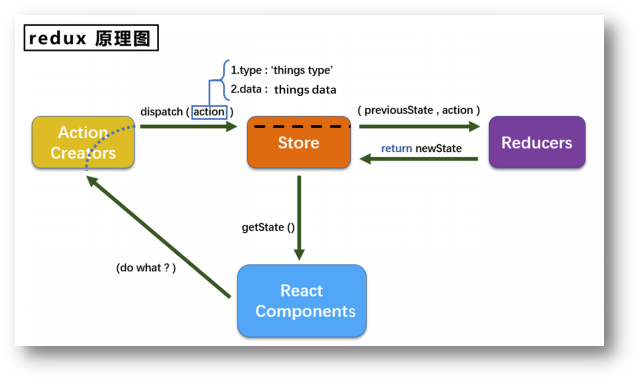
Redux action
- 动作的对象
- 包含 2 个属性
type:标识属性,值为字符串,唯一,必要属性data:数据属性,值类型任意,可选属性
- 示例代码jsx
{ type: 'ADD_STUDENT',data:{name: 'tom',age:18} }
Redux reducer
- 用于初始化状态、加工状态。
- 加工时,根据旧的
state和action,产生新的state的纯函数。
function reduxer(preState = 12, action) {
  console.log(preState, action)
  const { type, data } = action
  switch (type) {
    case 'add':
      return preState + data
    case 'decrement':
      return preState - data
    case 'cheng':
      return preState * data
    case 'chu':
      return preState / data
    default:
      return preState
  }
}

export default reduxerRedux store
将
state、action、reducer联系在一起的对象如何得到此对象?
import {createStore} from 'redux'import reducer from './reducers'const store = createStore(reducer)
jsximport { createStore } from 'redux' import reduxer from './reduxer' const store = createStore(reduxer) export default store此对象的功能?
getState(): 得到statedispatch(action): 分发action, 触发reducer调用, 产生新的state。注意:他只负责返回新的state,不负责页面更新,因此此时页面还是旧数据。subscribe(listener): 注册监听, 当产生了新的state时, 自动调用
jsximport React, { Component } from 'react' import store from '../redux/store' export default class Count extends Component { componentDidMount() { store.subscribe(() => { this.setState({}) }) } addFn = () => { const { value } = this.selectNum store.dispatch({ type: 'add', data: value * 1 }) } addOddFn = () => { const { value } = this.selectNum const count = store.getState() if (count % 2 !== 0) { store.dispatch({ type: 'add', data: value * 1 }) } } addAsyncFn = () => { const { value } = this.selectNum setTimeout(() => { store.dispatch({ type: 'add', data: value * 1 }) }, 500) } render() { return ( <div> <h1>当前和为:{store.getState()}</h1> <select ref={(c) => (this.selectNum = c)}> <option value="1">1</option> <option value="2">2</option> <option value="3">3</option> </select> <button onClick={this.addFn}>+</button> <button onClick={this.addOddFn}>奇数加</button> <button onClick={this.addAsyncFn}>异步加</button> </div> ) } }
Redux核心API
Redux createStore
作用:创建包含指定 reducer 的 store 对象
Redux store对象
- 作用:
redux库最核心的管理对象 - 它内部维护着:
statereducer
- 核心方法:
getState()dispatch(action)subscribe(listener)
- 具体编码:
store.getState()store.dispatch({type:'INCREMENT', number})store.subscribe(render)
Redux applyMiddleware
作用:应用上基于 redux 的中间件(插件库)
使用:
引入插件
shyarn add redux-thunk引入
applyMiddleware方法与redux-thunk方法jsximport { applyMiddleware } from 'redux' import thunk from 'redux-thunk'注册方法
jsx- export default createStore(redux) + export default createStore(redux, applyMiddleware(thunk))创建异步的方法
jsxexport const createAction = (data, time) => { return (dispatch) => { setTimeout(() => { dispatch({ type: 'xxx', data }) }, time) } }官方文档说了,开启了中间件后,
dispatch()如果发现action是一个函数,会帮你封装。上方的代码中,刚好return返回一个函数,因此无需手动调用store。异步
action不是必须要用的。使用
jsxuseActionFn = () => { store.dispatch(createAction(1, 500)) }
Redux combineReducers
作用:合并多个 reducer 函数
Redux react-redux
Redux react-redux理解
- 一个 React 插件库
- 专门用来简化 React 应用中使用
redux
Redux react-redux模型图
- 所有的 UI 组件都应该被一个容器组件包裹,他们是父子关系
- 容器组件真正和
redux打交道,里面可以使用redux的 API - UI 组件中不能使用
redux的 API - 容器组件会传给 UI 组件以下数据:
redux中保存的状态- 用于操作的状态
- 容器给 UI 传递状态、操作状态的方法,均通过
props传递
Redux react-redux分类
react-Redux 将所有组件分成两大类
- UI 组件
- 只负责 UI 的呈现,不带有任何业务逻辑
- 通过
props接收数据(一般数据和函数) - 不使用任何 Redux 的 API
- 一般保存在
components文件夹下
- 容器组件
- 负责管理数据和业务逻辑,不负责 UI 的呈现
- 使用 Redux 的 API
- 一般保存在
containers文件夹下
Redux react-redux相关API
Provider:让所有组件都可以得到state数据connect:用于包装 UI 组件生成容器组件mapStateToProps:将外部的数据(即state对象)转换为 UI 组件的标签属性mapDispatchToProps:将分发action的函数转换为 UI 组件的标签属性
Redux react-redux容器组件创建
安装
react-reduxshyarn add react-redux引入之前的组件(现在是作为 UI 组件)
jsximport CountUI from '../../components/Count'引入
connect方法,连接 UI 组件与reduxjsximport { connect } from 'react-redux'使用
jsxconst CountContainer = connect()(CountUI)上方代码看出两个信息:
connect是一个函数- 其返回值也是一个函数
建立联系固定写法是在返回的函数中传参需要连接的 UI 组件。
导出
jsxexport default CountContainer
总体代码:
import CountUI from '../../components/Count'
import { connect } from 'react-redux'

const CountContainer = connect()(CountUI)
export default CountContainerRedux react-redux容器组件连接
容器组件需要使用 store ,但是不能自己直接引入,而是要在父组件传入来,代码如下:
import React, { Component } from 'react'
import Count from '../comtainers/Count'
import store from '../redux/store'

export default class App extends Component {
  render() {
    return {
      <div>
        // 给容器组件传递store
        <Count store={store} />
      </div>
    }
  }
}容器组件传递的 store 给 UI 组件使用,该如何实现呢?前面组件传值都是 <A a="1" /> 的 key 和 value 形式传参,但是 UI 组件这里不适用,需要通过函数的返回值作为状态传递给 UI 组件,代码如下:
import CountUI from '../../components/Count'
import { connect } from 'react-redux'

function mapStateToProps() {
  return { key: 'value' }
}
function mapDispatchToProps() {
  return {
    fn: () => console.log(1),
    func: () => console.log(2),
  }
}

const CountContainer = connect(mapStateToProps, mapDispatchToProps)(CountUI)
export default CountContainer
- 返回的
key作为传递给 UI 组件props的key,value作为 UI 组件props的value——状态。- 返回的
key: fn作为传递给 UI 组件的key,作为 UI 组件props的value——操作状态的方法。
此时去往 UI 组件打印 this.props ,能够接收到一个对象,其中包含 APP 组件传递的 store 、connect 连接时接收的对象 key 和方法 fn 。
在函数中如果想要使用 store 内的变量,只需要通过形参的方式接收状态 state 即可。代码如下所示:
function mapStateProps(state) {
  return { key: state }
}UI 组件调用函数方法时,就触发传过去的函数的回调。因此 UI 组件调用方法传参,在 return 的回调函数中通过形参接收。函数中可以直接获取操作状态 dispatch ,代码如下:
mapDispatchToPropsfunction mapDispatchToProps(dispatch) {
  return {
    fn: (number) => dispatch({type: 'add', data: number}),
    func: (number) => dispatch({type: 'lose', data: number}),
  }
}Redux react-redux坑
- 如果状态不传对象而传其他类型,会报错,提示你需要返回一个对象
- 如果父组件不通过
store={store}传递store,运行后会报错没有store
Redux react-redux代码优化
Redux react-redux简写mapDispatchToProps
connect 方法中可以直接传函数,代码如下:
export default connect(
  (state) => ({ count: state }),
  (dispatch) => ({
    fn: (num) => dispatch({ type: 'add', data: num }),
  }),
)(CountUI)其中,第二个参数又可以省略,不用传一个函数,直接传一个对象,代码如下:
export default connect((state) => ({ count: state }), {
  fn: (data) => ({ type: 'add', data }),
})(CountUI)原理:
对象这个写法,相当于为 UI 组件的 props 传递一个名为 fn 的 action 函数,UI 组件调用 fn 后实际上就是调用 data => ({type: 'add', data}) 这个箭头函数。
然后好像在这里就停住了,他无法调用 dispatch 。这里我们只需要做到这里就好了,react-redux 在底层帮我们处理了,我们只需要给他一个 action 函数,他底部会帮我们调用 dispatch 。
Redux react-redux Provider组件使用
在使用 redux 时,需要使用 store.subscribe() 监测变化更新视图,代码如下:
store.subscribe(() => {
  ReactDOM.render(<App />, document.getElementById('root'))
})使用了 react-redux 后,我们不再需要 store.subscribe() 监测也能实现效果了。原理是容器组件是通过 connect()() 创建建立连接的,因此底部已经检测了,不需要我们再监测了。
前面使用一个容器组件时,通过为标签添加 store={store} 实现传递 store 。但是如果多个容器组件时,一个一个写显然不太合理,可以直接使用 Provider 方法统一传递 store 对象,代码如下:
<Provider store={store}>
  <App />
</Provider>Redux react-redux整合组件
UI 组件和容器组件分开两个文件后期容易文件冗余不好维护,把两个组件整合到一起作为一个组件。UI 组件无需暴露,容器组件与 UI 组件建立连接后暴露容器组件即可。代码如下所示:
import React, { Component } from 'react'
import { connect } from 'react-redux'

class Count extends Component {
  handleAddFn = () => {
    this.props.add(5)
  }
  render() {
    return (
      <>
        <div>当前求和为:{this.props.count}</div>
        <button onClick={this.handleAddFn}>加一</button>
      </>
    )
  }
}

export default connect((state) => ({ count: state }), {
  add: (data) => ({ type: 'add', data }),
})(Count)Redux react-redux数据共享
如果有多个 reducer 需要共享数据,上面的方法显然不合适,他只能挂载一个 reducer 。要如何挂载多个状态呢?我们都知道,js 中能挂载多个变量的方法只有数组和对象,而相对而言,对象是更优于数组的。
这个时候需要使用到 combineReducers ,combine 翻译成中文就是合并,其是一个函数,往里面传一个对象,代码如下:
import { createStore, applyMiddleware, combineReducers } from 'redux'
import count_redux from './reduxer'
import person_reduxer from './reduxerperson'

const a = combineReducers({
  pre: person_reduxer,
  count: count_redux,
})
const store = createStore(a)

export default store现在,store 的状态就有了两个属性可以使用,运行一下看看效果,发现报错,报错信息如下所示:
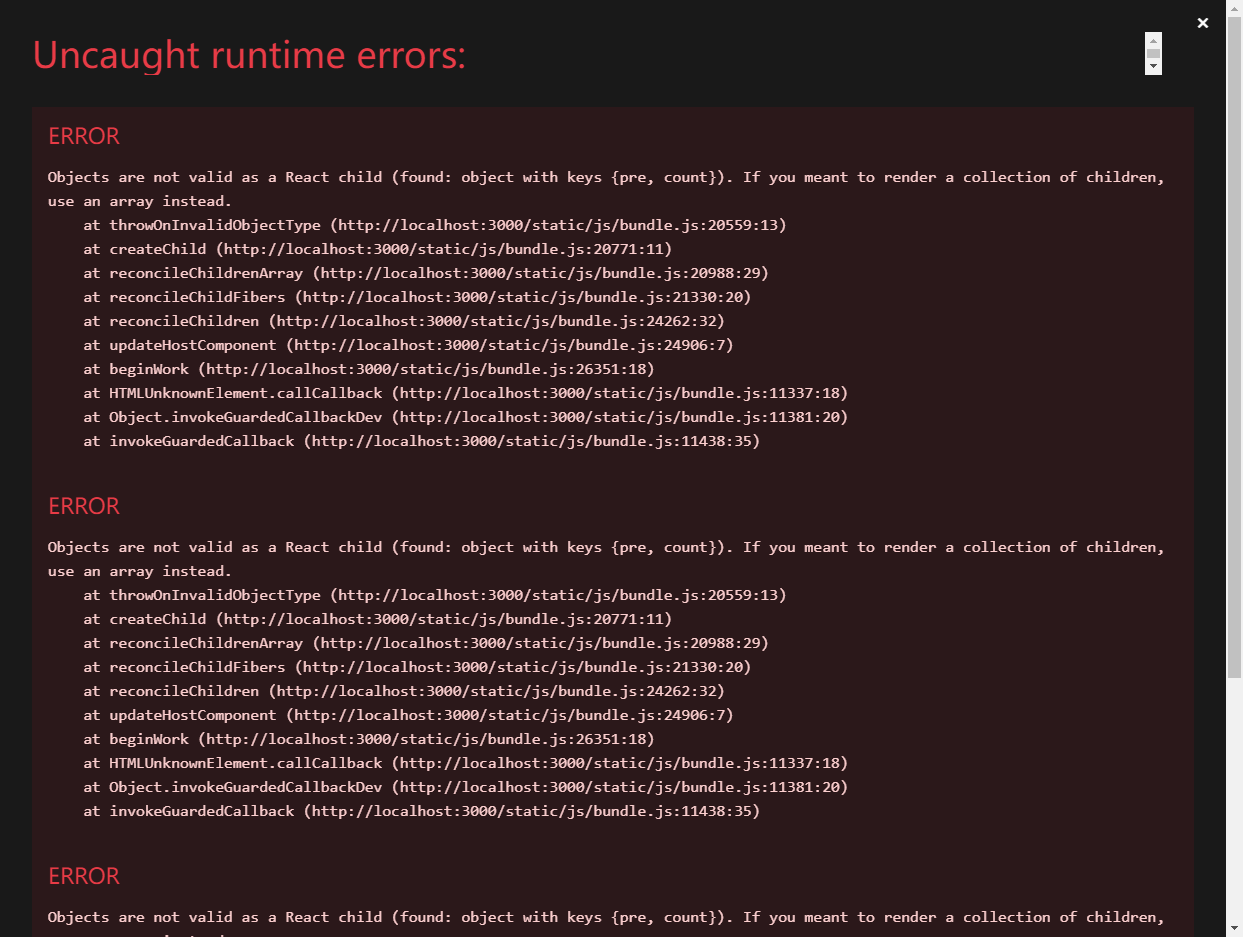
在 Count 组件中,我们写了这么一段代码 (state) => ({count: state}) 。在之前没有做数据共享状态合并前他只是一个普通的变量,因此可以直接使用。而现在做了共享合并后,state 已经是合并状态了,即是 {pre: person_reduxer, count: count_redux} 。因此在容器组件中需要通过对象点语法来获取。代码如下:
export default connect((state) => ({ count: state.count }), {
  add: (data) => ({ type: 'add', data }),
})(Count)如果想要使用其他 reducer 内的变量可以在 state 中获取,直接在 state 箭头函数中返回的对象内添加即可。
Redux react-redux纯函数
- 不得改写参数的数据,如
arr.unshift() - 不会产生任何副作用,例如网络请求、输入和输出设备
- 不能调用
Date.now()或Math.random()这种可以得到不同输出的方法
redux 内的 reducer 必须是要纯函数。实际业务中,不纯的业务只能放到 action 中。
Redux react-redux总结
概念
- UI 组件:不能使用任何
redux组件,只负责页面呈现、交互 - 容器组件:负责和
redux通信,把结果给 UI 组件呈现
- UI 组件:不能使用任何
创建
connect(mapStateToProps, mapDispatchToProps)(UI组件)。其中:mapStateToProps:映射状态,返回是一个对象mapDispatchToProps:映射操作状态的方法,返回值是一个对象函数
数据共享
- 数据共享后的
reducer要使用combineReducers进行合并,合并后是一个对象 - 交给
store的是总reducer,在组件内使用状态时要通过点语法获取对象内的值
- 数据共享后的
注意事项
- 容器组件中的
store是拿props传递去的,而不是容器组件中直接引入 mapDispatchToProps可以是一个函数,也可以是一个对象- 数据共享时如果发现数据地址相同,则不会更新视图(如数组的
push、unshift等方法)。因此需要改变地址来达到视图更新的效果
- 容器组件中的
Redux调试工具
通过下载 redux-devtools 工具进行调试(谷歌需要使用梯子去谷歌商店下载)
新版 import { configureStore } from '@reduxjs/toolkit'
Redux打包
通过 npm run build 打包,打包后的文件不可直接打开预览,需要放到服务器中。可下载第三方库 serve 创建静态服务器。
- 下载sh
npm i serve -g - 使用
在需要开启的根目录文件夹的终端下输入命令 serve 即可
serve如果在该文件夹下创建一个 a 文件夹,并以该 a 文件夹作为服务器开启,则通过以下的方式开启即可
serve a
# 或
serve ./a贡献者
 平安喜乐
平安喜乐 duyidao 刀刀
 v_duyilin