基于 FullCalendar 的日程表组件封装与实践
刀刀
0字
0分钟
2026/8/16
概述
在企业级任务管理系统中,日程表是核心交互模块之一。为满足查看当月每日日程、定制化日程样式及日期联动等需求,本项目引入了 FullCalendar 组件库。本文详细阐述基于 @fullcalendar/vue3 的日程表组件封装方案,涵盖插槽定制、数据驱动配置及跨组件联动机制。
核心依赖与初始化
依赖安装
FullCalendar 采用模块化设计,需按需引入核心库、视图插件及交互插件。bash
pnpm i @fullcalendar/core @fullcalendar/daygrid @fullcalendar/interaction @fullcalendar/vue3组件挂载与插槽定制
通过 FullCalendar 提供的具名插槽,可深度定制"更多日程"提示及单个日程卡片的渲染逻辑。
vue
<template>
  <FullCalendar
    ref="calendarRef"
    class="demo-app-calendar flex-1 h-0"
    :options="calendarOptions"
  >
    <!-- 定制"还有 X 个日程"的展示 -->
    <template #moreLinkContent="arg">
      <span class="text-major text-12px font-400">
        还有{{ arg.num }}个日程
      </span>
    </template>

    <!-- 定制单个日程卡片的展示 -->
    <template #eventContent="arg">
      <div
        class="event-title flex items-center px-6px truncate hover:opacity-70"
        :style="getEventTitleStyle(arg)"
      >
        <span
          class="border-dot hidden shrink-0 mr-4px"
          :style="{ backgroundColor: arg.event.textColor }"
        />
        <span class="event-label">{{ arg.event.title }}</span>
      </div>
    </template>
  </FullCalendar>
</template>

<script lang="ts" setup>
import FullCalendar from '@fullcalendar/vue3'
// ... 逻辑代码
</script>数据驱动与参数配置
日程表的核心在于 calendarOptions 的配置。通过 datesSet 回调,可实现视图切换时的数据自动拉取与渲染。
核心参数矩阵
| 参数名 | 类型 | 说明 |
|---|---|---|
plugins | Array | 启用的插件列表(如 dayGridPlugin、interactionPlugin) |
initialView | String | 初始视图模式,如 'dayGridMonth'(月视图) |
headerToolbar | Object | 顶部工具栏配置,设为空对象可隐藏默认工具栏 |
locale | Object | 国际化语言包,如 zhCnLocale |
dayMaxEvents | Boolean/Number | 限制单日最大显示事件数,超出部分折叠 |
datesSet | Function | 视图渲染或日期范围变更时触发的回调,用于异步获取数据 |
数据获取与事件源注入
在 datesSet 中获取当前视图的起止时间,调用接口获取数据后,通过 addEventSource 注入事件源。
typescript
import dayGridPlugin from '@fullcalendar/daygrid'
import interactionPlugin from '@fullcalendar/interaction'
import zhCnLocale from '@fullcalendar/core/locales/zh-cn'
import dayjs from 'dayjs'

const eventColors = ['#158cf5', '#746bec', '#f27e57', '#38c5b4', '#ef4c6c']

const calendarOptions = {
  plugins: [dayGridPlugin, interactionPlugin],
  headerToolbar: { right: '', left: '', center: '' }, // 隐藏默认工具栏
  locale: zhCnLocale,
  initialView: 'dayGridMonth',
  editable: false,
  selectable: false,
  dayMaxEvents: true,
  weekends: true,

  // 自定义事件排序(按时间从新到旧)
  eventOrder(eventA: any, eventB: any) {
    return dayjs(eventB.time).isAfter(dayjs(eventA.time)) ? 1 : -1
  },

  // 视图变更时拉取数据
  async datesSet(info: any) {
    const res = await fetchTaskCalendar({
      startTime: dayjs(info.startStr).format('YYYY-MM-DD'),
      endTime: dayjs(info.endStr).format('YYYY-MM-DD'),
    })

    // 映射数据并分配循环颜色
    const source = res.rows.map((item: any, index: number) => {
      const color = eventColors[index % eventColors.length]
      return {
        ...item,
        textColor: color,
        backgroundColor: `${color}33`,
        borderColor: `${color}33`,
      }
    })

    // 清除旧事件源并注入新数据
    info.view.calendar.getEventSources().forEach((eventSource: any) => {
      eventSource.remove()
    })
    info.view.calendar?.addEventSource(source)

    // 同步外部日期选择器状态
    setCurDate()
  },
}跨组件联动:日期选择器
为实现外部 a-date-picker 与日程表的双向联动,需通过 ref 获取 FullCalendar 实例并调用其暴露的 API。
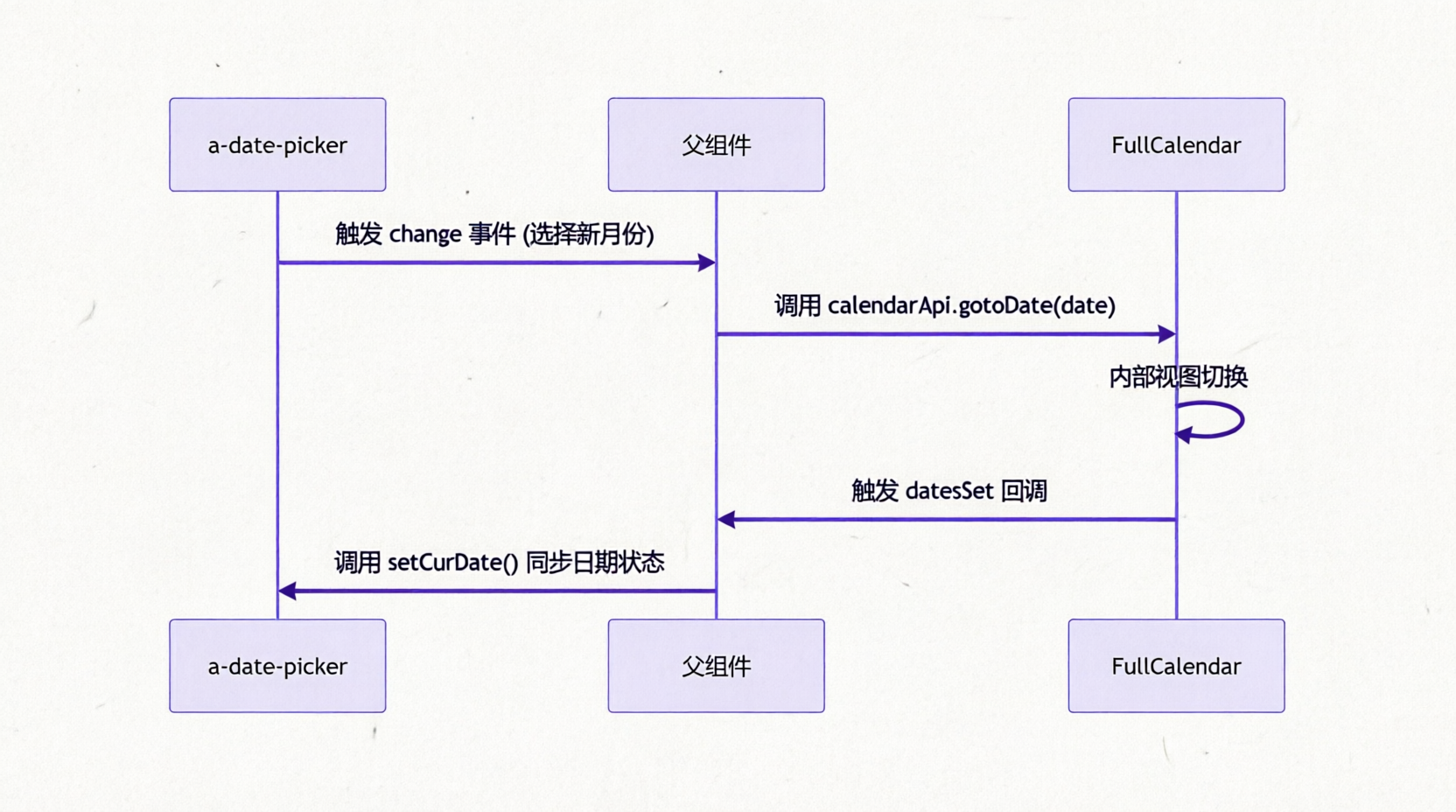
联动代码实现
typescript
const calendarRef = ref()
const calendarApi = computed(() => calendarRef.value?.getApi())
const curDate = ref()

// 外部日期选择器变更
function handleDatePickerChange(date: Dayjs) {
  calendarApi.value?.gotoDate(date.toDate())
}

// 内部视图变更同步至外部
function setCurDate() {
  curDate.value = dayjs(calendarApi.value?.getDate())
}贡献者
 duyidao 刀刀